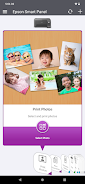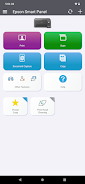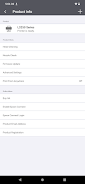

The Epson Smart Panel App is your mobile command center for Epson wireless printers and scanners. It simplifies setting up, monitoring, and operating your Epson products directly from your mobile device. The app boasts innovative action tiles for quick and easy use, autoconfiguration and customization tailored to your preferences, and a unified interface for both Epson printers and scanners.
However, it's important to note that the app only connects to products listed on the Epson website. For unsupported products, you'll need to use alternative apps like Epson iPrint or Document Scan. The app requires a download and a compatible smart device, and data usage fees may apply. For further information and support, visit www.epson.com.
Here are the key advantages of the Epson Smart Panel app:
- Effortless Setup, Monitoring, and Operation: Easily set up, monitor, and operate your Epson wireless printer or scanner from your mobile device.
- Innovative Action Tiles: The app features innovative action tiles that make using Epson products simple and quick.
- Autoconfiguration and Customization: The app automatically configures and customizes the user experience, making it easier to use and tailored to your individual preferences.
- Convenient Support: Get the support you need by registering your product, ordering supplies, or finding help all within the app.
- Unified Interface for Printers and Scanners: The app provides a single interface for both Epson printers and scanners, streamlining the user experience and making it more efficient.
- Compatibility and Data Usage: The app requires downloading the Epson Smart Panel app on a compatible smart device, and data usage fees may apply. For more information and support, visit the Epson website.